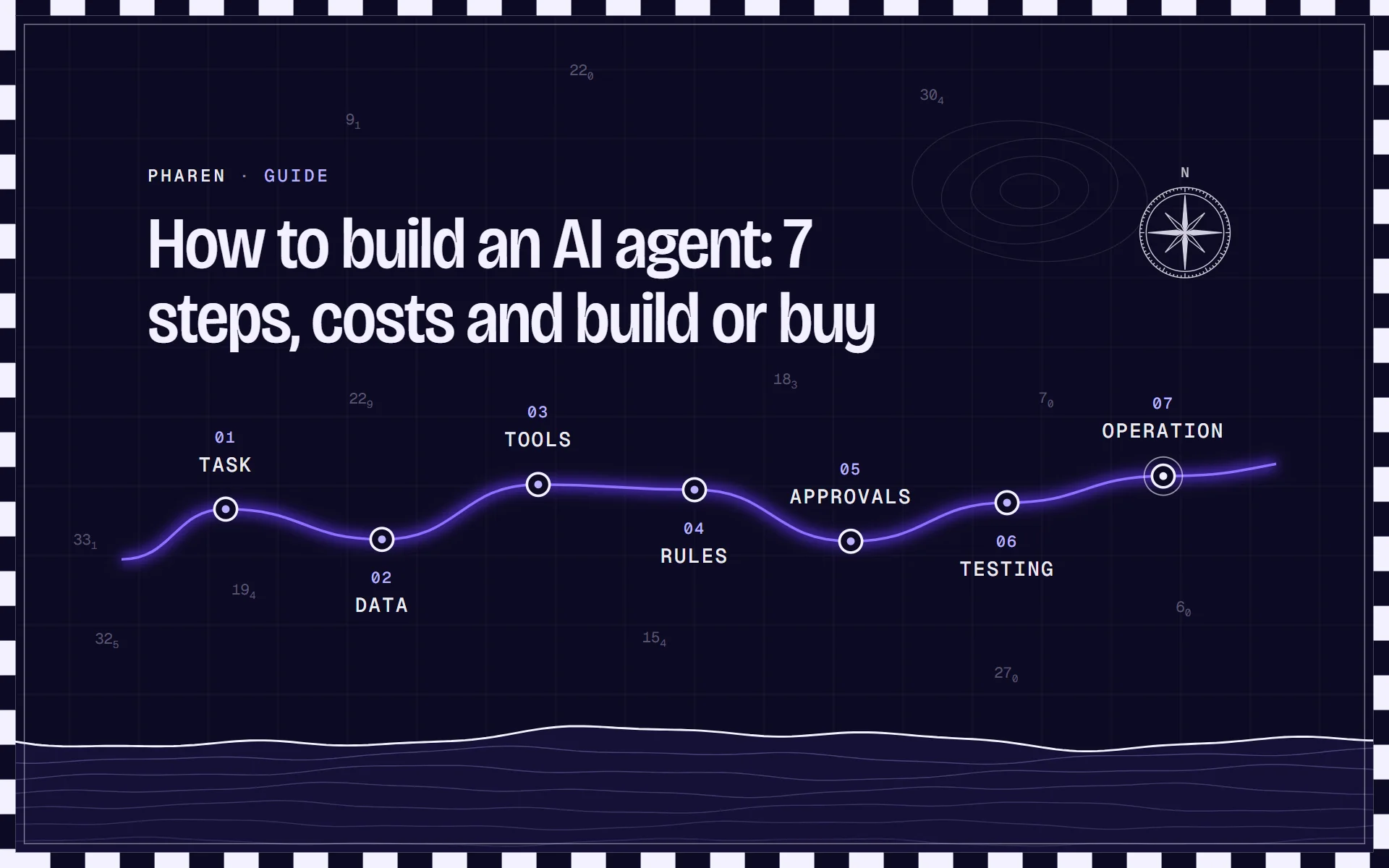
If you want to know how to build an AI agent for your business, the answer has seven steps: define the task, connect the data, enable the tools, write the rules, build in approvals, test on real cases and organise operation. For a first agent in a clearly defined workflow, we charge from €1,999 one-off and from €199 a month for support, both plus VAT, with the AI model costs billed by usage on top.
In a Bitkom survey from September 2026 (in German) among German companies with 20 or more employees that use, plan or discuss AI, 11% already use AI agents, 29% plan to and 31% are discussing it.
What is an AI agent?
Germany’s Federal Office for Information Security (BSI) describes an AI agent as software that carries out actions on its own based on a large language model, possibly with more access rights than a chatbot, according to the BSI page on AI agents (in German). In a business, that means the agent receives a task, fetches data, uses tools such as an inbox, a list or a CRM and delivers a result.
Two things are often confused with it. A chat window such as ChatGPT answers the question someone asks and then waits. Classic automation follows fixed rules and fails as soon as the data arrives messy. An agent reads messy input such as PDFs and emails, decides on the next step within its limits and stops when it is unsure.
In practice, an agent almost always sits inside a workflow. The workflow decides when the agent starts, what happens afterwards and where a person approves. That keeps a record of what the agent did, which you will need when someone asks why an invoice ended up with the wrong job site.
What are the seven building blocks of an AI agent?
Every agent we build has the same seven building blocks.
1. Define the task
Write the task in one sentence, the way you would explain it to a trainee on day one. At the roofing firm Hobeck, it says in essence: read every incoming invoice, fill in 8 fields, suggest the job site and flag whatever you cannot recognise with certainty. “Take care of the accounting” is no task; a person would struggle with it too.
A task has three parts: what comes in (an invoice as a PDF or email), what should come out (8 completed fields and a suggestion) and when the agent stops (missing required details or a possible duplicate). Add the baseline: cases per month and minutes per case today. Without it, you cannot judge the agent later. Our AI agent examples include a five point check for finding the right first workflow.
2. Connect the data
An agent needs three kinds of data: the incoming items such as invoices, enquiries or orders, reference knowledge such as the list of current job sites at Hobeck or a trader’s price list, and completed cases that show how your team decides. How to prepare reference knowledge so an AI finds the right source is explained in our guide to an AI knowledge base.
Before the build, set aside 30 real, completed cases together with the result your team chose at the time. They become your test set. Also decide which data may go to which AI model. In Pharen Hub you choose between GPT, Claude, Gemini and Mistral, and nothing in the workspace is used for training.
3. Enable the tools
Tools are the agent’s hands: reading an inbox, creating an entry in a list, looking up a contact in the CRM, handing a file over to DATEV, the German accounting software. They connect through the programs’ interfaces, through MCP or by email, and this is where the biggest risk lies.
The BSI advises giving an agent only the access its task needs, because attackers hide commands in websites, documents or emails that an agent may carry out as real instructions. An invoice agent reads PDFs from outside senders, so it should never be able to trigger a bank transfer. We classify every tool like this:
| Tool | Read | Write | Approval needed? |
|---|---|---|---|
| Inbox | yes | create a draft | before every send |
| List or table | yes | create and change entries | usually not |
| CRM | look up contacts | note or new contact | on status changes |
| Accounting, e.g. DATEV | no | hand over a document | yes, beforehand |
| Payments | no | no | stays with a person |
At Hobeck, invoices go to DATEV only after approval, and payments are still made by hand. In the lead routing at a consulting firm, the workflow sends nobody a message and turns nobody down.
4. Write the rules
Not every decision belongs to the language model. Anything you can write as an if-then sentence becomes a fixed rule. At Hobeck there are four exceptions that stop the workflow: missing required details, a possible duplicate, an unclear cost centre and a value the recognition cannot determine with certainty. On top comes the amount rule above which management approves.
In the lead routing, an agent sorts new enquiries by need, relevance and timing. A rule then decides by region which team gets them: North, East, South or West. Rules cost no AI fees and behave the same every day. The model reads and suggests, and the rule decides where the case goes next.
5. Build in approvals
In its measures against evasion attacks on language models from November 2025 (German news page with English publications), the BSI names explicit user confirmation before the model executes functions. In our projects, anything that moves money, reaches customers or cannot be undone waits for a person.
Good approvals are quick. At Hobeck, the responsible person sees the document and the fields side by side, and the work per invoice takes under 30 seconds. If an approval stalls, the Hub sends a reminder. At Jagrati Abroad, the team decides what gets filmed, and the agents deliver only the shoot pack. In Pharen Hub, anything critical an agent would do next waits until a person approves it.
6. Test on real cases
Test the agent on your real cases, in this order:
- Run the test set. The 30 completed cases from building block 2 go through the agent.
- Compare the results. Every field and every suggestion is set against what your team decided at the time.
- Sort the errors. Misread, rule missing or knowledge missing. Each type has a different fix: a better instruction, a new rule or additional data.
- Run in parallel. For one to two weeks, the agent works alongside the person who does the workflow today. Nothing goes out automatically.
- Go live with approvals. Only when the results are right does the agent replace the manual work, and the approvals stay in place.
Test the hard cases on purpose. At Jagrati Abroad, the review agent received a draft with 3 unsupported claims in a test, among them a guaranteed admission, and found all 3, as the Jagrati Abroad case study describes.
7. Organise operation
Decide who owns the agent, who reads the run log and which two or three figures you check every month: cases, minutes per case and how often the agent stops. At Hobeck, the workflow holds back about 4 possible duplicates a month. If a figure like this jumps suddenly, something has usually changed at a supplier or in a program.
When a program, a price list or a process changes, the agent needs adjusting, which our support covers. If your agent talks to customers directly, for example as a chat on your website, make clear that an AI is answering. The transparency rules in Article 50 of the EU AI Act have applied since 2 August 2026, according to the EU AI Act Service Desk timeline. This is general guidance and does not replace legal advice.
What does it cost to build an AI agent?
With us, a first AI agent starts at €1,999 one-off and support at €199 a month, both plus VAT. What drives the price can be said in advance: how many programs the agent has to connect and how clean your data is today. On top come the AI model costs, billed by usage. If the agent runs in Pharen Hub, we add 20% to the actual AI costs, plus the Hub plan.
The hidden item is your own time. The person who does the workflow today answers questions, checks the test set and tests with us. Plan a few hours a week for this in the first weeks. Our implementation page describes what we build and how we hand it over.
Worked example: incoming invoices
Hobeck receives around 160 invoices a month. Each used to take about 5 minutes, more than 13 hours in total. Today, under 30 seconds per invoice remain, and Hobeck saves around 12 hours a month. At €39.60 labour cost per hour worked in construction, according to Germany’s Federal Statistical Office (Destatis, in German), that is around €475. Because invoices are approved faster, around €1,000 a month in early payment discounts (Skonto) come on top, about €1,500 in total.
Set against our prices, around €1,300 a month remain after €199 for support, before AI costs. On these numbers, the one-off €1,999 would be recovered after about two months. All figures are in the Hobeck case study, and our post on automating incoming invoices shows how we calculated them.
Worked example: a retailer’s inbox
Now an example with openly stated assumptions. A retailer receives 300 customer emails a month about delivery times, returns and availability. Each reply takes 4 minutes today, 20 hours in total. An agent writes drafts with the right documents, and checking takes 1 minute per email, so 5 hours. That saves 15 hours, which at €37.20 per hour in trade, according to Destatis, comes to around €560 a month.
After €199 for support, around €360 remain, minus AI costs. The €1,999 would be recovered after about six months. If the number of emails halves, the agent hardly pays off, and you should know that before the build.
Should you build the agent yourself or have it built?
A team can build a simple agent on its own today. In ChatGPT or Microsoft Copilot you can build assistants that know your templates and price lists. We practise that in the one day workshop “Build your own assistants”, with no coding, bookable on our workshops page.
It gets harder as soon as several programs work together, accounting or CRM data is involved or mistakes cost money:
| Question | Build it yourself | Have it built |
|---|---|---|
| How many programs are involved? | one or none | two or more |
| What does a mistake cost? | a correction | money or a customer |
| Who looks after it afterwards? | someone in the team with time | nobody in particular |
| How often does the workflow run? | now and then, on demand | daily, with a baseline |
A middle route often works best. We build the first agent together with you, your team learns along the way, and you build the second one yourselves.
Where are the limits, and what mistakes are common?
Most agents fail at the same points, and hardly ever because of the AI itself:
- The task is too big. “Take the load off the office” is a goal for a year. An agent gets one workflow.
- The agent does rule work. The restaurant BeeBee in Ilmenau reconciles till, online shop and delivery platforms every evening with fixed rules and almost no language model, in about 5 minutes instead of 60.
- Too many permissions. An agent that reads emails from strangers must not transfer money or send anything unchecked.
- Nobody is responsible. Without a person who reads the run log, an error first shows up at the customer.
- Testing only on tidy examples. The incomplete invoice and the email with three requests belong in the test set.
Sometimes it is better to leave it. If a workflow comes up only a few times a month, an agent saves less than it costs. If every error reaches the customer immediately and no approval can be built in, start somewhere else. And if the data exists only on paper or in a program without an interface, digitisation comes first. We say so in the first call.
Frequently asked questions about how to build an AI agent
How long does it take to build an AI agent?
That depends mainly on how many programs are connected and how quickly your team tests. We start with a workflow from your business, so you check the first results on real cases early. Plan for the build, the test set and one to two weeks of parallel running.
Do you need coding skills to build an AI agent?
Not for simple agents. In ChatGPT or Microsoft Copilot you describe the task in plain language. As soon as interfaces to accounting, the CRM or inventory software come in, you need someone who sets up data flows and access properly.
Which AI model should an agent use?
The model that fits the task. For reading invoices, accuracy and cost per document count; for texts to customers, tone and language matter more. In Pharen Hub you can choose GPT, Claude, Gemini or Mistral.
Can an AI agent send emails or pay invoices on its own?
Technically yes, and we advise against it. The BSI recommends that important actions run only after a person confirms them, especially where there are financial consequences. In our agents, anything that moves money or reaches customers waits for approval.
What does an AI agent cost to run?
With us, support starts at €199 a month plus VAT, with AI costs by usage on top. If the agent runs in Pharen Hub, the Hub plan and 20% on the actual AI costs are added. The AI costs depend on the model and the volume, and the test set gives you a good estimate.
Does an AI agent have to be labelled?
The transparency rules in Article 50 of the EU AI Act have applied since 2 August 2026. People who talk to an agent directly, for example in a chat on your website, should be able to recognise that they are dealing with an AI. An agent that prepares invoices internally talks to nobody outside the company. For your specific case, ask your legal adviser.
Summary
An AI agent is built from seven blocks: task, data, tools, rules, approvals, testing and operation. The AI model is the smallest of them. At Hobeck, the finished agent turned more than 13 hours of invoice work a month into just over one, because someone first wrote down what it may do and where it stops.
If you have a workflow that would suit an agent, get in touch and bring your numbers: cases per month and minutes per case.