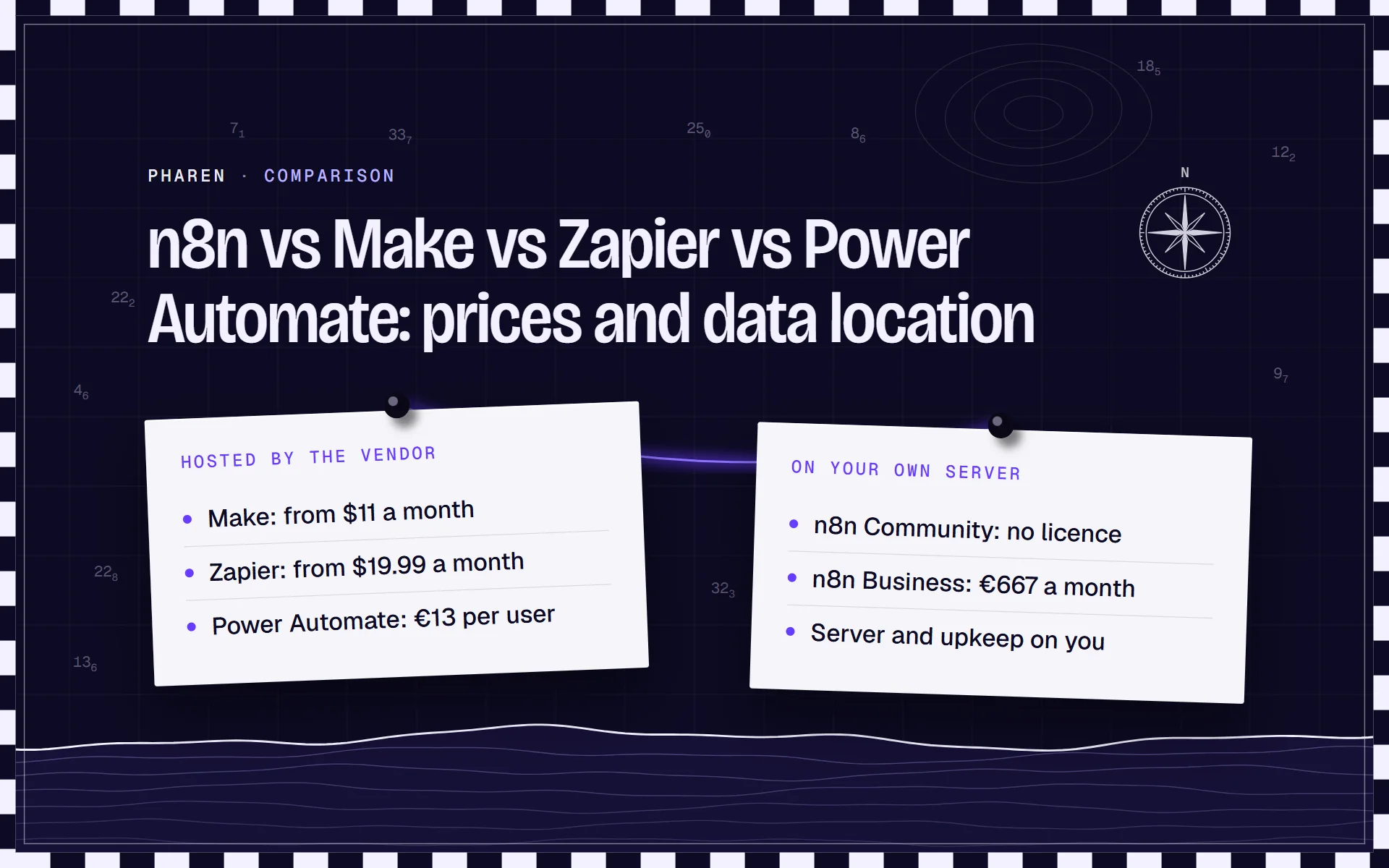
n8n vs Make vs Zapier, with Power Automate as the fourth option, comes down to three questions: where your data may go, how many steps your workflows have and who in your team builds them. n8n fits when data should stay on your own servers and workflows run through many steps. Make and Zapier fit when a team without developers needs a working connection quickly. Power Automate fits when your business already runs on Microsoft 365. Paid plans start at $11 a month for Make Core, €20 for n8n Starter, $19.99 for Zapier Pro and €13.00 per user for Power Automate Premium, each billed annually, as of November 2026.
Those entry prices tell you little about the final bill. Each of the four tools counts a different unit: executions, credits, tasks or users. The same workflow can stay in the smallest plan with one provider and land two tiers higher with another.
We compare the four tools on billing, data location, learning curve and AI features and run two worked examples with real volumes. At the end we place the workflows in Pharen Hub, our own platform, against the same criteria.
What is workflow automation?
Workflow automation connects software through fixed sequences. When something happens in one program, another program takes the next step automatically. A web form enquiry becomes a contact in the CRM, an invoice in the inbox becomes a row in a list, an online shop order becomes an entry in accounting. Each of these workflows consists of a trigger and several actions.
Tools such as n8n, Make, Zapier and Power Automate build these workflows from ready-made blocks, so nobody has to program an interface by hand. The blocks now include AI steps that read text, sort emails or write drafts. When a workflow needs more judgement than fixed rules can give, an AI agent comes in. Our guide on how to build an AI agent covers that part.
How do n8n, Make, Zapier and Power Automate charge?
All four handle the basics: triggers, actions, conditions and a run log. They differ in where they run, how they bill and who in the team is meant to use them.
n8n: billed per execution
According to its pricing page, n8n bills per execution, however many steps a workflow has, and every plan allows unlimited users and workflows. Starter costs €24 a month, or €20 billed annually, for 2,500 executions. Pro costs €60, or €50 billed annually, for 10,000 executions. Both run in n8n’s cloud, and n8n stores the data of hosted plans on servers in Frankfurt, Germany.
The Business plan, at €800 a month or €667 billed annually, runs only on your own servers, and n8n aims it at companies with fewer than 100 employees. Outside the paid plans, n8n points to a standard self-hosted version on GitHub. Running it takes someone who sets up the server and installs updates.
Make: billed per credit
Make’s pricing page bills in credits. Most actions cost one credit, some AI features cost more, and routers and error handlers are free. At 10,000 credits a month, Core costs $16, Pro $28 and Teams $51, or $11, $20 and $36 billed annually. The Free plan includes 1,000 credits a month.
For data location, Make offers data zones in the US and in the EU. Make’s help page on AI providers and data zones states that choosing an EU zone does not automatically mean every request is processed in the EU. The Maia assistant, Make AI Web Search and all OpenAI models in Make’s own AI provider send requests to the US whatever zone you choose.
Zapier: billed per task
Zapier’s pricing page bills in tasks. A task is every successful action, AI steps and code steps included, while triggers, filters, formatting, paths and delays do not count. Pro costs $19.99 a month for 750 tasks, $39 for 1,500 and $129 for 10,000, billed annually. Monthly billing costs 50% more, and the Team plan starts at $69 for 2,000 tasks.
The Free plan allows 100 tasks and two-step workflows only. On data location, Zapier’s data privacy overview says that Zapier hosts data on AWS servers in the United States and does not offer EU-only storage.
Power Automate: billed per user or per bot
On Microsoft’s pricing page, Power Automate Premium costs €13.00 per user per month and Power Automate Process €130.00 per bot per month, both paid yearly and excluding VAT. Microsoft notes that the prices are shown for marketing purposes and that the actual price appears at checkout.
According to Microsoft’s overview of licence types, licences across Microsoft 365 include a limited set of Power Automate capabilities, and the free licence is limited to standard connectors. Premium adds premium and custom connectors, on-premises data gateways and 5,000 AI Builder credits a month. Workflows that run on a machine without a signed-in person need a Process licence.
How do the four tools compare on price and data location?
This table summarises what we found on the providers’ pages. Prices are in the currency of each pricing page, for the smallest paid plan, as of November 2026.
| Tool | Billing unit | Entry price per month | Where the data sits |
|---|---|---|---|
| n8n | execution | €20 annual, €24 monthly | Frankfurt or your own server |
| Make | credit | $11 annual, $16 monthly | EU or US data zone, some AI in the US |
| Zapier | task | $19.99 annual, $29.99 monthly | United States |
| Power Automate | user or bot | €13.00 per user, annual | your Microsoft tenant |
The table does not settle the legal side. If personal data runs through a workflow, you need a data processing agreement with each provider, and storage in the US means you have to check the data transfer as well. This is general guidance as of November 2026 and does not replace legal advice.
Worked example: 160 invoices a month
Take a workflow like the incoming invoice process at the roofing firm Hobeck, which receives around 160 invoices a month, as described in the incoming invoice case study. Our assumption: each invoice runs through 8 steps, one trigger and 7 actions such as reading, checking, adding to a list, sending a reminder and handing over to accounting. We leave out AI model costs because they come on top with every tool.
| Tool | Usage per month | Matching plan | Price per month |
|---|---|---|---|
| n8n | 160 executions | Starter | €20 annual, €24 monthly |
| Make | about 1,300 credits | Core | $11 annual, $16 monthly |
| Zapier | 1,120 tasks | Pro with 1,500 tasks | $39 annual, $58.50 monthly |
| Power Automate | per user | Premium | €13.00 per user, annual |
Zapier’s Free plan is ruled out because it allows two-step workflows only. Make’s 1,000 free credits fall just short. With Power Automate, the price depends on how many people build or use workflows and whether you need premium connectors.
Worked example: 800 enquiries a month
As volume grows, the gaps widen. Take the lead routing from our lead generation case study: around 800 enquiries a month, again with 8 steps each. In n8n that stays at 800 executions, and Starter still covers it. Make needs about 6,400 credits and stays on Core.
Zapier counts 5,600 tasks, which puts you on Pro with 10,000 tasks at $129 a month billed annually. That is several times the price of n8n Starter. If you have many cases with many steps, look at the billing unit before the entry price. With per-execution billing, an extra step costs nothing.
Who can build with each tool, and what do the AI features do?
The learning curve cannot be calculated like a price. What follows is our experience from projects and has not been measured.
Who can work with it?
Zapier is the quickest to learn. A workflow reads as a list from top to bottom, and common apps come with ready-made templates. Make shows workflows as a diagram with branches, which is clear to read but needs some understanding of data structures.
n8n allows your own code steps in JavaScript and Python and pays off when someone in the team thinks technically. Self-hosting adds server maintenance. Power Automate feels familiar to anyone who knows Microsoft 365, but licences and premium connectors get complicated quickly.
What can the AI features do?
According to its pricing page, n8n includes agents, MCP and AI nodes in Starter, Pro and Enterprise, plus human approval for tool calls. Make’s AI features cost more credits than ordinary actions, and Make offers the Maia assistant. In Zapier, AI steps count as tasks, and one MCP tool call counts as two. Power Automate Premium includes 5,000 AI Builder credits a month.
The same caution applies to all four. A model that reads emails from strangers must not send or pay anything unchecked, so check whether the tool lets a person approve before an AI step triggers an action. If a workflow talks to customers directly, for example as a chat, make clear that an AI is answering. Our AI transparency page explains how we handle AI ourselves.
Which tool fits your business?
We choose in five steps:
- Write the workflow down. Trigger, steps, apps involved and volume per month. Without these numbers you cannot work out a plan.
- Clarify the data. If personal data or trade secrets run through the workflow, data location becomes the first criterion.
- Check the connectors. Is there a ready-made block for every app involved? If one is missing, you need an API connection or code.
- Calculate the billing unit. Volume times steps, once per execution, per credit, per task and per user.
- Decide who runs it. Who builds, who maintains, who reads the run log? A tool without an owner stops working after the first change in a connected app.
These steps usually leave a clear answer. n8n fits when data should stay on your own servers, workflows have many steps and someone in the team is technically confident. Make fits when workflows with branches should be built without a developer and the EU data zone is enough. Zapier fits quick, simple connections at moderate volume, as long as US storage is acceptable for your data. Power Automate fits when your business runs on Microsoft 365 and the workflows stay there.
Where do the workflows in Pharen Hub fit in?
Pharen Hub is our own platform, with chat, docs, tasks, mail, calendar and AI agents in one workspace. Processes with many steps run as workflows, and anything critical an agent would do next waits until a person approves it. At Hobeck, checked invoices run through such a workflow all the way to DATEV, the German accounting software.
You choose between GPT, Claude, Gemini and Mistral, and nothing in the workspace is used for training. The Hub runs on Hetzner Cloud in Germany, on your own server or in your own cloud on Azure, AWS, Google Cloud, Hetzner or Kubernetes. We connect Microsoft 365, Google Workspace and MCP and check CRM and ERP connections technically first. If your agent runs in the Hub, we add 20% to the actual AI costs, plus the Hub plan.
If you mainly need many ready-made connectors between well-known cloud apps, look at the four tools above first. The same applies if all you need is email, file storage or chat. The Hub makes sense when agents, approvals and documents should sit in one place, as in Hobeck’s invoice process. If you want to host it yourself, our guide to a self-hosted ChatGPT alternative compares the options.
What mistakes should you avoid when choosing?
The most common mistakes have little to do with the tool itself:
- Buying on entry price. With 800 cases of 8 steps each, Zapier costs several times its entry price.
- Forgetting AI costs. Credits, tasks and executions rarely include the cost of the language models, and Make charges extra credits for AI features.
- Confusing an EU zone with EU processing. Make itself says that AI requests can run in the US despite an EU zone.
- Self-hosting without an owner. A self-hosted n8n server needs updates, backups and monitoring. Without them, the savings turn into costs.
- Automating a poor process. Automation makes a detour faster and leaves it just as long.
- Critical steps without approval. Payments, emails to customers and deletions belong in front of a person.
Sometimes you need no tool at all. If a workflow runs ten times a month, a good template is often quicker to set up than any automation. If the data exists only on paper, digitisation comes first and the workflow second.
Frequently asked questions about n8n vs Make vs Zapier
Which automation tool is the cheapest?
That depends on your volume and the number of steps. For a few cases with a few steps, Make and Zapier are cheap. With many steps, n8n’s per-execution billing usually works out cheapest, as of November 2026.
Which tool is GDPR compliant?
GDPR compliance depends on how you use a tool, so none of the four is compliant by default. n8n offers hosting in Frankfurt or on your own servers, Make an EU data zone with exceptions for AI, and Zapier stores data in the US. Clarify data processing agreements and data transfers with your data protection adviser.
Can you use n8n for free?
n8n points to a standard self-hosted version on GitHub, outside its paid plans. You pay no plan fee for it, but you pay for the server, the setup and the maintenance. Without technical staff, a paid n8n plan is usually the better calculation.
Is Power Automate included in Microsoft 365?
Microsoft 365 licences include a limited set of Power Automate capabilities. For premium connectors and on-premises data, you need Premium at €13.00 per user per month, billed annually. Your Microsoft partner can tell you what your licence covers.
Can you build AI agents into these tools?
Yes. All four offer AI steps, and n8n offers agents with human approval for tool calls. The more an agent decides on its own, the more permissions, tests and approvals matter. Our implementation page shows how we build agents into workflows.
Summary
Once you do the arithmetic, the choice narrows quickly. Write the workflow down, count cases and steps, clarify where the data may go and calculate the billing unit. After that, rarely more than two tools remain. Zapier or Make often cover simple connections, n8n suits data control and many steps, and Power Automate suits businesses that run on Microsoft 365. Where AI steps belong inside such a workflow is the subject of our post on AI process automation.
If you are deciding between two tools for one of your workflows, get in touch. We will calculate it with you before anyone builds the first step.