An AI knowledge base makes company knowledge searchable by first finding the matching passages in your documents for every question and then letting the language model answer only on that basis, with a reference to the source. The method is called retrieval-augmented generation, or RAG, and was described in a 2020 research paper. In our worked example for an office of 15 people, the time it saves on searching is worth about €1,125 a month.
Every company has places where knowledge goes to hide. One is called Quote_final_v3_new.docx, another is a folder from 2019, a third is the head of a colleague who is on holiday right now. Whoever needs the answer asks around, opens ten files and in the end takes the one that looks newest.
An AI knowledge base finds the right passage if you set it up properly. We explain RAG in plain language, show what matters for documents, permissions and freshness, and work out when the effort pays off.
What is an AI knowledge base?
An AI knowledge base is a collection of your documents that you can question in everyday language. You type a question such as “What notice period is in the framework agreement with our supplier?” and get an answer that points to the contract and the clause. The documents stay where they are, and the AI reads them again for every question.
It differs from classic full-text search because it searches by meaning. Ask about holiday entitlement and you also find the paragraph on annual leave, even though the word entitlement does not appear in it. Instead of a list of hits, you get a summarised answer.
It differs even more from training your own model. Germany’s Federal Office for Information Security (BSI) describes RAG in its paper Generative AI Models: Opportunities and Risks for Industry and Authorities (version 2.0, 17 January 2025). A search finds relevant information in a knowledge database and passes it to the model together with the user’s question, without that content having been used as training material beforehand. Your manuals stay outside the model and are put in front of it for each answer.
How does RAG work?
Picture a librarian who has read every document in your business and, for each question, picks out the three matching pages. She hands them to a skilled writer, who writes an answer from them and adds the page numbers. That is RAG in one picture.
The 2020 paper by Patrick Lewis and colleagues calls the two parts parametric and non-parametric memory. The first sits inside the language model itself, the second is a searchable index of documents. The authors named two open problems of language models on their own: they cannot show where a statement comes from, and their knowledge is hard to update.
Step 1: Split
The documents are split into short sections, often a few paragraphs long. An 80-page manual becomes a few hundred index cards this way. How well that works depends heavily on the document, and a clean Word file is easier than a scanned delivery note with a coffee stain.
Step 2: Index by meaning
Each section is translated into a sequence of numbers that describes its meaning. Sections with similar content get similar numbers, whatever words they use. These sequences are stored in an index, and the technical term for it is vector database.
Step 3: Search
When someone asks a question, it is translated the same way, and the system looks for the sections with the most similar numbers. At this point a good system first checks which documents the person asking may see at all. Anything they may not see never makes it into the selection.
Step 4: Answer with the source
The sections found go to the language model together with the question. It writes the answer and names the sections it relies on. If it finds no matching passage, it should say so instead of guessing.
Which five things decide the quality?
The technology is standard by now. Whether your knowledge base is useful in daily work is decided in five places that have little to do with technology.
Which documents go in
Start with a clearly limited set, for example all current work instructions or the answers to the most frequent customer questions. Remove old versions, or the AI will reliably find the price list from 2022. Where several versions exist, a person decides which one applies.
Who may see what
A knowledge base must never show anyone more than they can open today. The BSI recommends a proper rights and roles concept for this and advises against handling permissions through text instructions to the model, because those are open to attack. Microsoft states in its documentation on Microsoft 365 Copilot privacy that Copilot only surfaces organisational data the individual user has at least view permission for (as of November 2026).
That sounds reassuring and is a warning at the same time. If a folder of salary lists is shared with everyone by mistake, the AI finds it faster than any curious colleague. Clean up your sharing settings before you switch on the search.
How current the knowledge is
A major advantage of RAG is that new knowledge is available as soon as the document has been read in again. Clarify whether that happens automatically or someone has to trigger it. Give each area a responsible person who removes outdated documents.
Whether the source is visible
Every answer should show which document and which section it comes from. According to the BSI, this can mitigate the effects of hallucinations, because users can see which text excerpts an answer is based on and check it there. An answer without a source cannot be checked by anyone.
How hallucinations are handled
RAG lowers the risk of invented answers and does not rule it out. The model can summarise a passage wrongly or mix up two sections. For sensitive topics a check belongs in the process, and the system should be allowed to say plainly that it found no answer.
The Jagrati Abroad case study shows what such a check can look like. There, a separate agent checks every video script before the shoot, and in a test it removed all 3 unsupported claims, among them a guaranteed admission. The same principle works for answers from a knowledge base, so whatever has no source is taken out.
What does it look like in different sectors?
These are typical uses as we hear them in conversations with businesses. They show the scope, and the figures you need to collect for your own business.
- Skilled trades. Fitters on site ask for manufacturer details from data sheets and installation guides and get the page with the answer. The office finds the warranty period in the right contract without fetching the folder. More office tasks for trades businesses are in our post on AI for construction companies.
- Restaurants. New service staff ask about the allergens in a dish or the steps of the daily close. The answer comes from recipes and onboarding documents, and for allergens the kitchen double-checks. Other restaurant tasks are covered in AI in restaurants.
- Consulting. Consultants search earlier proposals and project reports for similar assignments. Permissions per client are mandatory here, so that client A never appears in an answer for client B.
- Education. A training provider answers questions on deadlines, documents and fees from examination regulations and information sheets. Because wrong information gets expensive here, every answer carries its source.
- Retail. A support chat on the website answers questions about delivery times and returns from your own terms and product data. In Pharen Hub this runs as a workflow that answers questions on your website with your knowledge as the source.
In all these examples, the answers are already written down somewhere. A knowledge base finds knowledge and does not create any.
Does it pay off for an office of 15 people?
Here is a worked example with the assumptions in the open. Each of 15 people spends 15 minutes a day searching for information in folders, emails and documents, and the knowledge base saves a third of that, so 5 minutes. We assume 20 working days a month and €45 per working hour, the German average for 2025 according to the Federal Statistical Office (Destatis), which we also use in our case studies.
On the cost side we use our entry prices. A first agent costs from €1,999 once and support from €199 a month, both plus VAT. If it runs in Pharen Hub, the Hub plan and the actual AI costs plus 20% are added.
| Item | Per month |
|---|---|
| Time saved: 15 people × 5 minutes × 20 days | 1,500 minutes or 25 hours |
| Value of the time: 25 hours × €45 | €1,125 |
| Support for the agent | €199 |
| Pharen Hub, Team plan for up to 20 people (beta price until 31 March 2027, then €158) | €79 |
| AI costs: assumed €50 of model costs plus 20% | €60 |
| Remaining after running costs | about €787 |
That puts about €338 of monthly costs against €1,125 of time value, which leaves about €787. At the regular Hub price of €158 the costs come to about €417 and about €708 remains. Either way the one-off €1,999 is recovered after about three months. Larger document sets, more sources or strict permissions make the build more expensive, and your search minutes may be lower than our assumption. So measure for a week how long your team really searches before you do the sums.
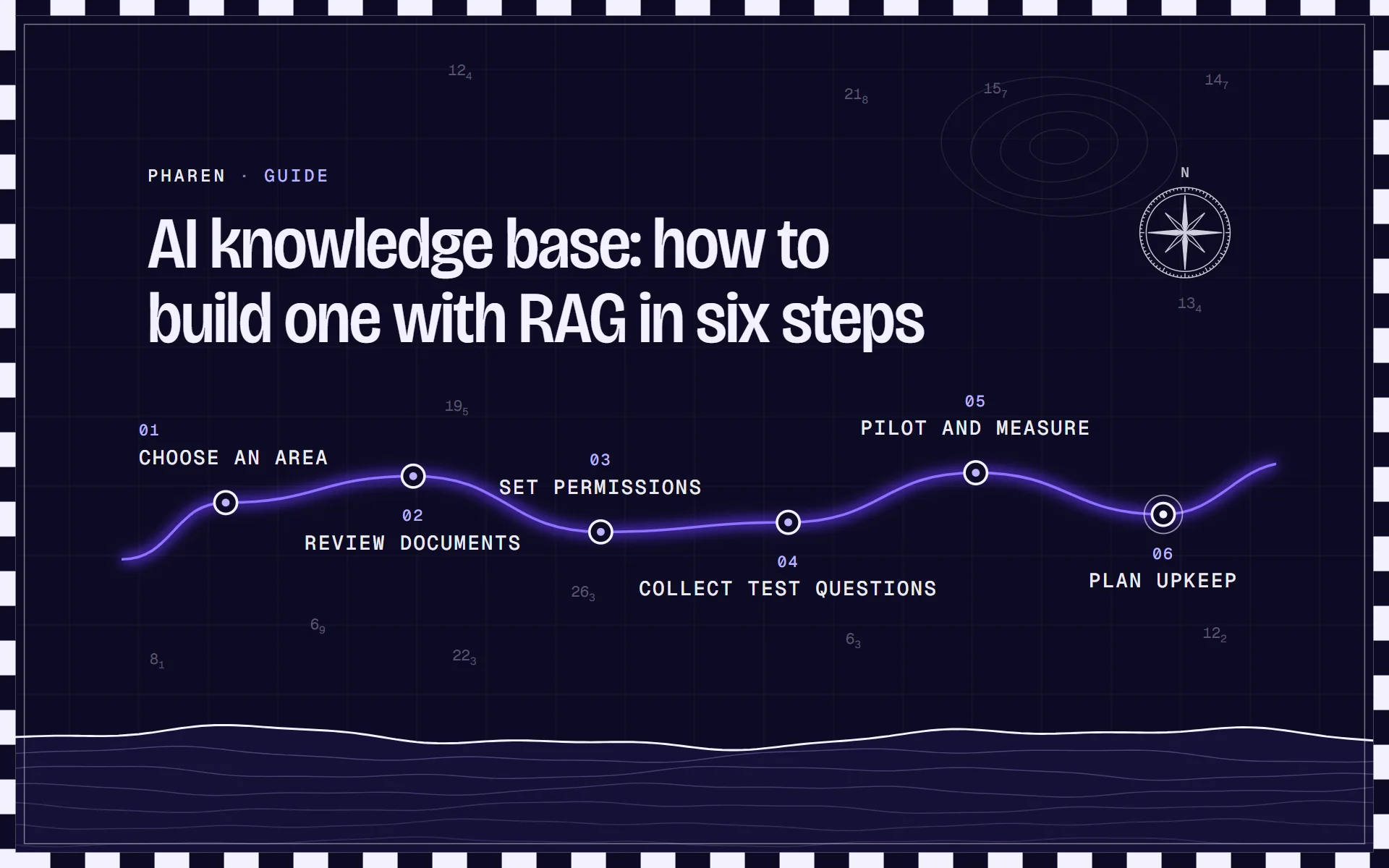
How do you build one in six steps?
If you want to build an AI knowledge base, this order gets you fastest to a result the team will use.
- Choose an area. Take the area with the most recurring questions, such as customer service or onboarding. Our AI opportunity analysis helps you rank areas by effort and benefit.
- Review documents. Collect what you have, remove old versions and duplicates, and name a responsible person for each folder.
- Set permissions. Write down which group may see which documents, and check the sharing settings in your file storage.
- Collect test questions. Note 30 real questions from daily work, each with the right answer and where to find it. They are your test for every version.
- Pilot and measure. Run the test questions and count how many are answered correctly and with the right source. Only when the result is right do more colleagues join.
- Plan upkeep. Decide how new documents get in and who removes old ones. Without this step, the knowledge base will be the digital version of the folder from 2019 within a year.
Where the knowledge base runs is your decision. Pharen Hub runs at Hetzner in Germany or on your own server, and nothing in your workspace is used for training. Cloud workspaces and your own servers are compared in our guide to a self-hosted ChatGPT alternative, and how a knowledge base works as part of an agent is shown in our AI agent examples.
What are the limits, and when should you skip it?
A knowledge base is only as good as the documents in it. The BSI names specific risks. Attackers may insert manipulated content into the knowledge base, which can lead to pre-crafted, wrong answers to specific questions, and they may try to extract the information stored in it. If you take in documents from outside, such as supplier documents or web pages, check them first.
Then there is indirect prompt injection. According to OWASP, it occurs when a language model accepts input from external sources such as websites or files that carry hidden instructions. OWASP states that research shows RAG does not fully mitigate this vulnerability. If your knowledge base is allowed to trigger actions, such as sending emails, a person should approve them.
For some questions RAG is the wrong tool. Current stock levels, open invoices or revenue figures sit in a database, and you are better off querying them there directly. Arithmetic is also not a strength of language models, even after they have found the right figures.
Leave it for now if your knowledge is hardly written down or your file storage holds five versions of every file. Then a month of tidying up does more than any AI. With only a few dozen documents, the search you already have is often enough.
Frequently asked questions about AI knowledge bases
Is an AI knowledge base the same as RAG?
RAG is the method, and the AI knowledge base is what you build with it. The knowledge base holds your documents, and RAG describes how the system finds the matching passages for each question and has the language model answer from them with the source.
What is the difference between RAG and training a model?
In training, a model learns from data and changes in the process. With RAG the model stays as it is and receives the matching sections from your documents with every question. That makes changes easy, because reading in a new document is enough.
Can an AI knowledge base still hallucinate?
Yes, less often, but it happens. The model can summarise sections wrongly or fill gaps. Visible sources, permission to say it found nothing and checks on sensitive topics keep the risk small.
Can everyone on the team see every document?
That must not happen, and it depends on the setup. A good system checks the permissions of the person asking with every search and only uses documents they are allowed to open. Check the sharing settings in your file storage beforehand, because the AI takes over the wrong ones too.
How much does an AI knowledge base cost?
That depends on the amount and condition of your documents, the sources and the permissions. With us, a first agent starts at €1,999 once and €199 a month for support, plus VAT, plus model costs by usage. We can tell you what your case costs after looking at your documents and questions.
Can customers use the knowledge base too?
Yes, for example as a support chat on your website. Then only documents that may be public go in, and the chat should hand open questions over to a person. In Pharen Hub, such a workflow can be embedded as a chat on your website.
Summary
An AI knowledge base answers questions from your own documents and names the document and section it relies on. It works when the documents are tidied up, the permissions are right and every answer shows its source. Start with one area and 30 test questions, and after a few weeks you will know whether it is worth it. As part of our implementation work, we build assistants that know your manuals, contracts and meeting notes, and you decide which documents they can see. Get in touch if you want to see how that would work with your documents.